Real Kick VIP
EdiX can grant real Kick VIP badges to your viewers — as shop rewards, leaderboard prizes, or manual grants — all from your dashboard.
extensionWhy an extension is needed
Kick has no public API for VIP, so no server can apply the badge on its own. The EdiX browser extension applies it through your own logged-in Kick session, right in your browser. Your password and cookies never leave your browser, and the pairing token authorizes only this channel's VIP queue — not your Kick account.
military_techSet it up
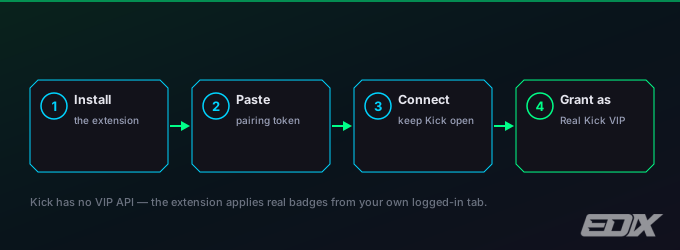
- Install the extension from the EdiX download page (Chrome, Edge or Brave).
- In your dashboard, open Settings → Connection, find the Auto VIP card and click Connect extension. Copy the pairing token.
- Paste the token into the extension — this links it to your channel's queue.
- Keep a kick.com tab for your channel open in the same browser while you stream.
- Set "Grant as" to Real Kick VIP so grants apply real badges.
starWays to grant VIP
- Shop reward — a timed Real Kick VIP item (see Points shop); viewers buy it with points.
- Leaderboard rewards — automatically VIP the top viewers of any of four boards: chatters, donators, gifters and loyalty. Each board is enabled and tuned on its own — how many viewers it covers, the period it looks back over, and how long the badge lasts.
- Manual — grant or remove VIP for any viewer from the VIP card in your dashboard.
A few things worth knowing about leaderboard rewards: the default duration is permanent, meaning the badge is only taken away when that viewer drops out of every board you have enabled — pick 24h, 7d or 30d if you want it to expire on its own. A viewer who tops several boards gets one badge, keeping the longest duration. You and your bots are skipped, and EdiX stops at 90 active grants to stay under Kick's VIP limit.
If the dashboard says the extension isn't detected, make sure it's installed, you clicked Connect, and a kick.com tab for your channel is open — then reload the dashboard. Grants queue and apply once it connects.
Prefer not to install anything? Set "Grant as" to EdiX badge — rewards still work with an EdiX-native badge on your overlays, no extension required.